Rokid vs Xreal: The Ultimate AR Glasses Comparison
Rokid AR Glasses vs Xreal: Comprehensive Comparison of Features, Display, and User Experience
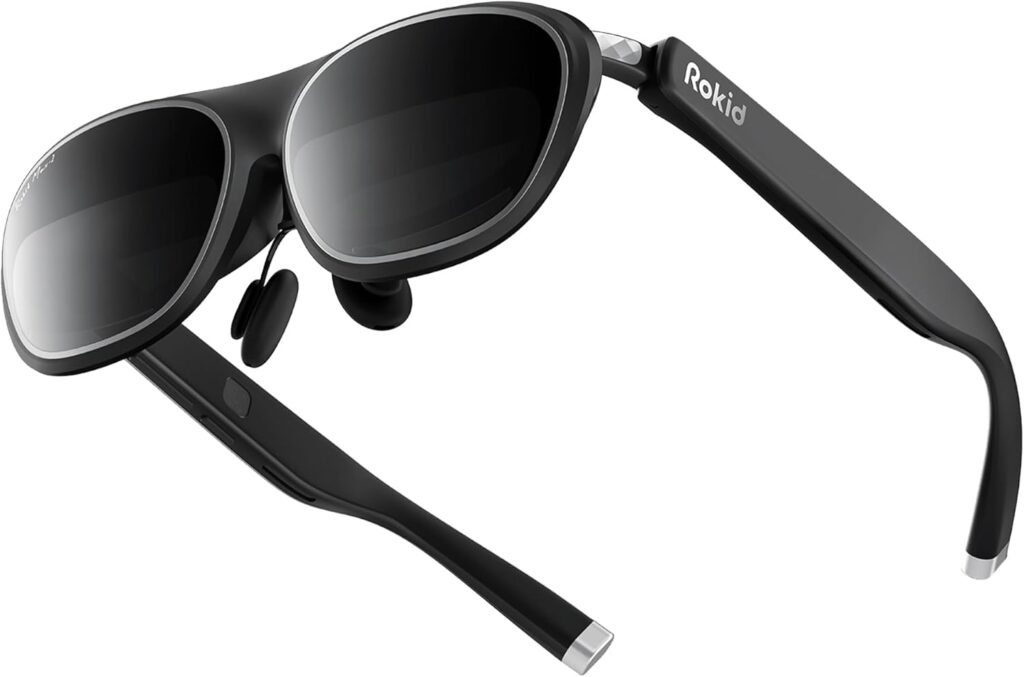
Rokid vs Xreal: The Ultimate AR Glasses Comparison: Choosing the right pair in a smart glasses comparison often comes down to balancing display fidelity, ergonomic design, audio performance, and software integration. Rokid AR Glasses vs Xreal represents two leading approaches to wearable displays: Rokid Max (and its Max 2 successor) focuses on Micro-OLED clarity and built-in diopters, while Xreal’s Air 2 Pro (and One Pro) emphasizes flat-prism optics and Bose-tuned audio. This AR glasses comparison guide maps out display quality, comfort, sound, connectivity, augmented reality capabilities, companion devices, and value for money. By the end, you’ll understand which headset best suits media consumption, productivity, or gaming needs—equipping you to make an informed choice in 2025’s expanding AR ecosystem.

Which AR Glasses Offer the Best Display Quality: Rokid Max vs Xreal Air 2 Pro?
Display quality defines immersion in augmented reality environments by combining resolution, refresh rate, field of view, and optical engineering. Both Rokid Max and Xreal Air 2 Pro employ high-density Micro-OLED panels at 120 Hz, but their optical stacks differ fundamentally. Rokid’s waveguide approach yields a slimmer temple profile, while Xreal’s flat-prism architecture maximizes edge-to-edge sharpness. Brightness handling and edge clarity further shape real-world performance in varied lighting. Understanding these hardware distinctions is essential before assessing comfort or audio nuances.
What Are the Key Differences in Display Technology Between Rokid and Xreal?
Rokid Max uses a waveguide optic to channel Micro-OLED output through etched glass, resulting in a low-profile design and balanced brightness uniformity across the image.
In contrast, Xreal Air 2 Pro incorporates flat-prism optics that directly reflect light, delivering pronounced edge-to-edge sharpness and minimal chromatic aberration. These optical choices influence weight distribution and bulk: waveguides tend to sit closer to the temples, while flat prisms add marginal thickness but enhance peripheral clarity. Understanding these optical foundations prepares us to compare core specifications.
How Do Resolution, Refresh Rate, and Field of View Compare?
The following table compares the core display specifications for each headset:
Each headset matches on pixel density and motion fluidity, but Rokid Max offers a slightly wider viewing angle. These metrics inform how immersive media appears and how comfortably text or UI elements scale. With resolution parity established, optics become the next decisive factor.
What Impact Do Flat-Prism and Waveguide Optics Have on Visual Clarity?
Flat-prism optics deliver crisp edges at the cost of a slightly thicker frame, while waveguides maintain a sleeker silhouette with very even luminance. These trade-offs affect perceived clarity in fast-paced video and UI detail. Having contrasted optics, the next step is to explore brightness and edge clarity under real-world conditions.
How Does Brightness and Edge Clarity Affect Viewing Experience?
- High peak brightness ensures readability in daylight-lit environments.
- Sharp edge clarity avoids color fringing at screen borders.
- Balanced luminance reduces eye fatigue during extended viewing.
Optimized brightness and well-engineered edge fidelity combine to reduce visual strain and preserve immersion, setting the stage for evaluating comfort and wearability in the next section.
Rokid Max 2 – BUY HERE
Real Air 2 Pro BUY HERE
How Do Rokid and Xreal AR Glasses Compare in Comfort and Design for Extended Use?
Comfort and design directly influence how long users can wear AR glasses without discomfort. Ergonomic balance, nose-pad adjustability, and frame materials determine pressure distribution, while vision correction options such as diopters or prescription inserts address individual needs. Both Rokid Max (75 g) and Xreal Air 2 Pro (87 g) aim for lightweight portability, but their temple geometry and nose-bridge contact points vary in feel. Assessing these factors predicts whether a headset stays snug during gaming marathons, productivity sessions, or long-form video viewing.
What Are the Weight and Ergonomic Differences Between Rokid Max and Xreal Air 2 Pro?
Rokid Max weighs approximately 75 g, distributing mass along a waveguide-infused frame for balanced front-to-back feel. Xreal Air 2 Pro at 87 g offsets its flat-prism glass with slightly wider temples to stabilize the headset.
- Rokid Max’s curved temple arms contour closely to the skull, reducing forward tilt.
- Air 2 Pro’s reinforced nose bridge offers steadiness during head turns.
- Both designs prioritize low total mass to minimize neck strain during prolonged wear.
These ergonomic strategies influence comfort perceptions and prepare us to compare nose-pad adjustability next.
Rokid Max 2 – BUY HERE
Real Air 2 Pro BUY HERE
How Do Adjustable Nose Pads and Frame Materials Influence Wearability?
Adjustable silicone nose pads on Rokid Max allow micro-tuning of vertical angle and bridge width, facilitating a secure seal without pinching. Xreal Air 2 Pro uses a lightweight magnesium-alloy frame with fixed pads that rely on a balanced weight center to reduce slip.
- Silicone pads adapt to varied nose profiles and improve long-session comfort.
- Magnesium frames resist deformation while maintaining structural rigidity.
- Frame finish coatings on both devices impact skin friction and heat buildup.
Optimal adjustability and material choice underpin wearer confidence during extended use, leading us to examine vision-correction solutions.
Which Vision Correction Options Are Available: Diopter Adjustment vs Prescription Inserts?
Rokid Max integrates a built-in diopter range (0 to −6 D) that users adjust via a temple-mounted dial, offering seamless focus without external lenses. Xreal Air 2 Pro supports aftermarket prescription inserts that clip into the frame, ensuring optical precision for higher-order corrections.
- Diopter dials enable on-the-fly focus tuning for multiple users.
- Prescription inserts deliver sharper acuity for those with astigmatism or multifocal needs.
- Both approaches preserve display alignment and maintain image centering.
Having weighed ergonomic comfort and vision support, we now turn to audio performance differences.
What Are the Audio Performance Differences Between Rokid and Xreal AR Glasses?
Audio quality transforms wearable displays into immersive media systems. Directional speakers, bass response, and spatial processing shape cinematic experiences without headphones. Rokid Max relies on built-in directional transducers, while Xreal Air 2 Pro enhances its drivers with Bose tuning for refined clarity. Key factors include bass depth, stereo separation, and sound leakage, all of which influence shareability and privacy. Evaluating these audio attributes determines whether a headset best serves entertainment, communication, or productivity scenarios.
Rokid Max 2 – BUY HERE
Real Air 2 Pro BUY HERE
How Do Built-in Speakers and Sound Quality Compare?
Rokid Max uses compact onboard speakers that project audio directly forward, delivering clear dialogue and midrange detail. Xreal Air 2 Pro’s integrated drivers benefit from Bose acoustic calibration, producing richer low end and more defined spatial cues.
- Rokid’s speaker placement reduces bleed into surrounding space.
- Xreal’s tuning accentuates bass without sacrificing vocal clarity.
- Both systems prioritize direct-to-ear delivery to minimize ambient interference.
This foundational audio comparison frames the role of third-party audio tuning next.
What Role Does Bose Tuning Play in Xreal’s Audio Experience?
Bose tuning in Xreal Air 2 Pro optimizes frequency response curves to deliver fuller bass, controlled mids, and crisp highs. Proprietary algorithms adjust driver resonance to reduce distortion at higher volumes.
- Enhanced low frequencies support cinematic soundtracks and gaming explosions.
- Controlled midrange articulation ensures clear voice reproduction during calls.
- High-frequency refinement adds positional cues for spatial audio applications.
With tuning benefits outlined, the next consideration is how bass, spatialization, and leakage affect real-world use.
How Do Bass, Spatial Audio, and Sound Leakage Affect User Experience?
- Deep bass reproduction enhances immersion in action scenes and musical content.
- Spatial audio processing creates a sense of directional depth for gaming and AR overlays.
- Minimal sound leakage protects privacy in shared environments and prevents disturbing bystanders.
Balancing these factors determines how well each headset serves collaborative workspaces, public transit use, or solitary entertainment, prompting a shift toward connectivity and ecosystem compatibility.
Rokid Max 2 – BUY HERE
Real Air 2 Pro BUY HERE
How Do Connectivity and Compatibility Features Differ Between Rokid and Xreal?
Connectivity and device support define how seamlessly AR glasses integrate into daily workflows. USB-C plug-and-play compatibility with smartphones, laptops, and consoles broadens application scope. Both Rokid Max and Xreal Air 2 Pro connect via USB-C, but Xreal Beam and Rokid Station further extend wireless casting and accessory support. Companion apps such as Nebula for Xreal and Rokid’s custom software manage display settings, AR overlays, and firmware updates. Evaluating these connectivity layers clarifies which ecosystem best fits a multi-device lifestyle.
Which Devices Are Compatible with Rokid Max and Xreal Air 2 Pro?
Rokid Max supports USB-C output from Android phones, Windows PCs, and select gaming consoles via adapter. Xreal Air 2 Pro pairs with modern Android devices, MacBooks, and PCs, with native Steam Deck integration.
- Both headsets accept HDMI-to-USB-C converters for legacy device support.
- Console use on Nintendo Switch and PlayStation requires third-party adapters.
- Cross-platform drivers enable extended desktop and VR-lite modes on computers.
Device compatibility underpins flexible usage and bridges to advanced ecosystem features.
What Connectivity Options Are Available: USB-C, Adapters, and Wireless?
USB-C remains the primary wired interface for high-bandwidth video and power. Optional HDMI-to-USB-C dongles allow connection to older PCs and gaming hardware. Rokid Station and Xreal Beam add wireless casting over local Wi-Fi for phone- or PC-based streaming without cables.
- Direct USB-C connections ensure minimal latency and full-resolution output.
- Adapter support extends compatibility to HDMI sources and VR-ready GPUs.
- Wireless modes trade slight latency for cable-free convenience during presentations or media playback.
Understanding connectivity options guides the choice of companion software for deeper integration.
How Do Companion Apps and Software Ecosystems Enhance Functionality?
Xreal’s Nebula app provides screen mirroring, AR window management, and custom calibration tools for fine-tuning optics and audio. Rokid’s proprietary software suite allows user profiles, diopter presets, and gesture controls for on-device navigation.
- Nebula supports multi-window layouts, enabling concurrent document review and video calls.
- Rokid’s UI offers quick-access brightness and focus adjustments via gestures.
- Firmware updates for both platforms deliver new AR features and performance optimizations.
Having explored integration layers, we now examine each headset’s core AR tracking and software capabilities.
Rokid Max 2 – BUY HERE
Real Air 2 Pro BUY HERE
What Are the Augmented Reality Capabilities of Rokid Max and Xreal Air 2 Pro?
Augmented reality capabilities hinge on tracking precision, processing power, and application support. Rokid Max offers three-degree-of-freedom (3DoF) head-tracking for fixed virtual screens, while Xreal Air 2 Pro advances to six-degree-of-freedom (6DoF) spatial tracking for anchored AR objects. Dedicated chips—X1 in Xreal and custom modules in Rokid—drive low-latency rendering and coordinate with companion apps. Supported AR applications range from productivity overlays and anatomy visualizations to light gaming experiences. Understanding these core AR features informs which device better serves immersive tasks.
How Do 3DoF and 6DoF Tracking Technologies Compare?
Rokid Max’s 3DoF tracking measures rotational motion across pitch, yaw, and roll, ideal for fixed-screen experiences like virtual monitors. Xreal Air 2 Pro’s 6DoF tracking adds positional awareness (forward/back, up/down, left/right), enabling true spatial anchoring of AR objects in physical space.
- 3DoF suffices for desk-bound productivity and streaming.
- 6DoF allows object interaction and realistic overlay placement in real-world environments.
- Both systems use onboard sensors, but 6DoF requires additional IMU calibration for floor-plan mapping.
Having contrasted tracking modes, the next factor is the processing engines powering each experience.
What Dedicated Chips and Software Power Each Device?
Xreal Air 2 Pro integrates the X1 chip to handle real-time AR rendering and sensor fusion, leveraging Nebula software for environment mapping. Rokid Max relies on a custom processor module optimized for low-latency video decode and built-in diopter control, interfacing with Rokid’s companion app.
- The X1 chip accelerates 6DoF spatial calculations and AR SDK support.
- Rokid’s module focuses on high-efficiency video pipelines and optical adjustments.
- Both platforms receive periodic firmware updates for new AR features and stability improvements.
With processing foundations identified, we can explore the range of supported AR applications and productivity enhancements.
Which AR Applications and Productivity Features Are Supported?
- Virtual multi-window desktops for document editing, spreadsheet review, and browser tabs.
- Lightweight 3D visualization tools for architecture, engineering, and education demos.
- Media-centric apps for 180° and 360° video playback with spatial audio support.
- Collaborative whiteboarding and annotation overlays in virtual meeting platforms.
These AR use cases illustrate each headset’s productivity and creative potential, paving the way for evaluating companion ecosystems.
How Do Rokid Station and Xreal Beam Companion Devices Enhance AR Glasses?
Companion devices extend AR glasses beyond tethered operation, offering standalone media streaming, enhanced battery life, and wireless casting. Rokid Station provides a built-in operating system, local storage, and app launcher, while Xreal Beam acts as a mobile media hub with Wi-Fi streaming and multi-device support. Both accessories transform their headsets into all-in-one wearable displays that operate independently from a host device. Comparing their standalone features reveals which ecosystem offers greater flexibility for on-the-go AR experiences.
What Standalone Functionalities Do Rokid Station and Xreal Beam Provide?
Rokid Station functions as an Android-based mini PC, hosting apps, local media files, and web browsing without a smartphone. Xreal Beam streams content from cloud or local servers via Wi-Fi, enabling untethered video playback and simple AR app demos.
- Rokid Station supports app installation from official stores and sideloaded APKs.
- Xreal Beam offers DLNA and AirPlay-style casting for seamless media transfer.
- Both units include HDMI-in options for external video sources.
Having established standalone roles, battery life and streaming capabilities are the next critical metrics.
Rokid Max 2 – BUY HERE
Real Air 2 Pro BUY HERE
How Do Battery Life and Streaming Support Compare?
Rokid Station’s internal battery delivers up to five hours of continuous streaming at moderate brightness, while Xreal Beam typically runs three to four hours under similar conditions. Both systems support hot-swapping of power banks via USB-C for extended sessions.
- Rokid Station’s power management optimizes CPU and display draw to prolong runtime.
- Xreal Beam prioritizes Wi-Fi connectivity to balance media buffering and energy use.
- Both devices recharge via PD-compatible chargers in under two hours.
Battery and streaming performance directly influence portability, leading us to assess wireless casting options and compatibility next.
What Wireless Casting and Device Compatibility Features Are Offered?
Rokid Station offers Miracast-style casting and USB-C direct connections for Android mirrors. Xreal Beam includes proprietary Nebula casting with multi-window layouts and cross-platform client apps.
- Rokid’s casting supports basic screen-share and Bluetooth audio routing.
- Xreal’s Nebula casting allows content control and window resizing on the fly.
- Both accessories pair with PCs, smartphones, and tablets over local networks.
These accessory ecosystems enhance core AR glasses and set the stage for value comparisons based on price and use case alignment.
What Is the Price and Value Comparison Between Rokid and Xreal AR Glasses?
Value in a smart glasses comparison arises from matching feature sets to retail prices, yielding the best feature-to-price ratio for specific use cases. Rokid Max launched at a mid-range price, with Rokid Max 2 positioned slightly higher to reflect optics and processing upgrades. Xreal Air 2 Pro sits near Rokid Max’s entry tier, while Xreal One Pro commands a premium for its advanced AR capabilities. Assessing retail positioning alongside core features clarifies which headset delivers the greatest return on investment for entertainment, productivity, or gaming.
How Do Retail Prices Compare for Rokid Max, Rokid Max 2, Xreal Air 2 Pro, and Xreal One Pro?
Retail prices vary by region and retailer, but generally:
- Rokid Max and Xreal Air 2 Pro occupy the mid-tier segment.
- Rokid Max 2 and Xreal One Pro target the premium tier with enhanced optics and tracking.
- Price differentials between entry and pro models often reflect hardware upgrades such as improved tracking chips or diopter ranges.
Understanding these brackets informs feature-to-price analysis.
Which AR Glasses Offer the Best Feature-to-Price Ratio?
- Rokid Max balances visual fidelity, built-in diopter adjustment, and a lean price point for media-centric users.
- Xreal Air 2 Pro pairs solid display specs with Bose-tuned audio at a comparable cost.
- Rokid Max 2 and Xreal One Pro add standalone AR and improved tracking for a higher premium.
This comparison highlights which model delivers core features most economically.
Which Models Are Best Suited for Entertainment, Productivity, and Gaming?
- Entertainment: Xreal Air 2 Pro for its audio tuning and edge clarity.
- Productivity: Rokid Max 2 with built-in diopter control and diorama-style multi-window support.
- Gaming: Xreal One Pro for 6DoF tracking and high-performance X1 chip.
Matching use cases to hardware strengths completes the feature alignment for prospective buyers.
Rokid Max excels at a balanced display-focused experience with convenient focus adjustment, while Xreal Air 2 Pro leads in audio clarity and flat-prism sharpness. Comfort and ecosystem choice hinge on personal fit and device compatibility. For deep AR interactions, Xreal One Pro’s 6DoF tracking and Nebula software offer unparalleled immersion, whereas Rokid Station transforms Max series glasses into a standalone media and productivity hub. Ultimately, assessing display, comfort, audio, connectivity, AR capabilities, and companion-device synergy ensures you select the AR glasses that best align with your entertainment, work, or gaming priorities.
Rokid Max 2 – BUY HERE
Real Air 2 Pro BUY HERE
